

When Android launched nearly two decades ago, writing mobile applications meant writing Java. Building software required verbose boilerplate, manual memory considerations, and continuous defensive coding against null references. Engineering teams simply accepted these structural hurdles as part of developing software for handheld devices.
Then came a shift that permanently altered mobile architecture.
Kotlin, a newer tool built to catch mistakes before they reach users. Six months in, the Java app has crashed four times in production. The Kotlin app hasn’t crashed once. That gap isn’t luck. It’s showing up across Android teams all through 2026, and it’s changing how businesses think about their tech stack.
The old Kotlin vs Java debate used to live in developer forums. Now it is the hot topic for CTOs while shaping hiring plans and security budgets. And how quickly a product actually ships.
Understanding which language fits your engineering roadmap requires looking past marketing hype. You must evaluate how Kotlin and Java perform across current Android frameworks, team structures, security realities, and cross-platform needs.
Kotlin vs Java in 2026: What Adoption Statistics Show
Kotlin didn’t creep into Android development. It took over. 80% to 92% of Android developers now build apps using Kotlin. Over 95% of the top 1,000 Play Store apps rely on Kotlin code. Google has made its choice clear for years: each Android app that Google builds is made in Kotlin, including the Maps app and the Drive app.
The change appears in places at the same time:
- Jetpack Compose, which is Android’s modern UI toolkit, provides only a Kotlin API.
- Kotlin Multiplatform adoption tripled, from 7% in 2024 to 23% now.
- Kotlin’s presence in backend development grew 15% year over year.
Android Development Adoption in 2026:
Kotlin Primary Usage: [========================] 85%+
Top Play Store Apps: [==========================] 95%+
New Google Internal: [============================] 100%
Starting a fresh Android project in Java today means losing access to the tools Google keeps building. That’s a real cost, not a theoretical one. It also shows up in hiring. New graduates and bootcamp developers are learning Kotlin first, so companies that stay on Java for new work end up competing for a shrinking pool of specialists willing to write it.
Java’s Enterprise Stronghold: Why Backends Haven’t Moved
When Kotlin owns mobile devices, in contrast, Java has its roots in the depth of enterprise server infrastructure. Over 90% of Fortune 500 companies use Java for core backend systems. Many rely on Java to run trades, manage logistics, and handle supply chains. Java remains a foundation for large-scale mission-critical business systems.
Enterprise Backend Primary Language Share:
Java: [====================] 33%
Kotlin: [====] 8%
Java maintains its backend dominance through three key factors:
Massive Talent Pool: Tens of millions of trained engineers understand Java enterprise frameworks, making technical hiring predictable for large organizations.
Aggressive Language Modernization: Recent Java releases introduced virtual threads, pattern matching, and record patterns. These additions reduced syntax verbosity and improved concurrent request handling on server hardware.
Low Migration ROI: For large companies, Kotlin and Java aren’t rivals fighting for the same job. Both languages compile to JVM bytecode, meaning raw performance remains essentially identical under real-world server loads.
Runtime Performance Benchmarks: A Direct Comparison
Engineers often debate which language executes faster. Because Kotlin and Java in 2026 Both compile down to the target bytecode, the runtime performance differences are negligible when dealing with standard business logic.
Workload Test | Kotlin Execution | Java Execution | Speed Margin |
JSON Serialization (1M objects) | 1,247 ms | 1,231 ms | Java ~1.3% faster |
Collection Processing (10M items) | 892 ms | 943 ms | Kotlin ~5.4% faster |
Concurrency (100K virtual tasks) | 1,456 ms | 1,523 ms | Kotlin ~4.4% faster |
Database ORM (50K queries) | 3,891 ms | 3,847 ms | Java ~1.1% faster |
Compilation speeds tell a different story. Java still holds a slight speed advantage during clean, full-project builds. However, Kotlin’s modern compiler delivers fast incremental builds. During everyday editing, Kotlin recompiles modified code quickly, keeping developer feedback loops tight.
The Real Difference Shows Up in the Bugs
Null Safety: Preventing Costly Runtime Errors
Null pointer exceptions have long caused random application crashes across mobile devices. Java treats null values as a fundamental reality. Ask any Android developer what breaks their app most often, and NullPointerException comes up fast. They wrap objects in optional containers or rely on IDE annotations to catch bugs before deployment.
Kotlin fixes this problem at the compiler level. It does this by separating nullable types from non-nullable types inside its type system.
// Kotlin enforces null safety at compile-time
var user: String = “Alex” // Cannot be null
var bio: String? = null // Explicitly allows null
println(user.length) // Compiles safely
println(bio?.length) // Requires safe-call navigation
This structural safeguard delivers measurable business benefits:
- Uber reduced overall crash rates by over 30% after migrating legacy mobile repositories to Kotlin.
- Pinterest experienced a 25% drop in null-related production defects during their language transition.
- Google observed 20% fewer overall bugs per line of code in Kotlin applications compared to equivalent Java projects.
Catching reference errors during compilation prevents broken app updates from reaching end users.
AI-Generated Code Security Risks
Artificial intelligence tools now produce a significant amount of code for businesses. Depending on AI to write code brings hidden security problems that engineering leaders need to handle with care. Studies show that more than 44 percent of code pieces made by AI contain security weaknesses, such as injection faults and poor encryption techniques.
AI-Generated Code Security Failure Rates by Language:
Java: [====================================] 72%
Python: [========================] 45%
C#: [========================] 45%
Kotlin: [=================] Reduced Surface Area
Java projects suffer higher vulnerability rates during AI generation due to verbose syntax and legacy boilerplate patterns. AI models often generate outdated Java methods or misconfigure complex security parameters.
Kotlin’s concise syntax and strict null checking give AI code assistants fewer places to introduce hidden errors. However, engineering teams must still run static code analysis and perform human peer reviews on all AI-generated contributions.
Kotlin Multiplatform: Efficient Cross-Platform Logic
Kotlin Multiplatform, or KMP, offers engineering teams a choice for building apps across multiple platforms. It’s different from cross-platform tools that create their own UI elements on top of native screens. With KMP, developers can reuse the core business logic across platforms. The user interface stays native using the tools provided by each platform. This keeps the app feeling natural while saving time on code duplication.
+————————————————————-+
| Shared Kotlin Business Logic |
| (Data Parsing, Networking, Local Storage) |
+————————————————————-+
| |
v v
+—————————+ +—————————+
| Android Native UI | | iOS Native UI |
| (Jetpack Compose) | | (SwiftUI) |
+—————————+ +—————————+
Teams using KMP report several core advantages:
Code Reuse: You can share networking, data parsing, and caching logic across Android and iOS. This means you do not have to write business logic.
Native User Experience: Android uses Jetpack Compose, and iOS uses SwiftUI. This gives users native performance and a smooth interface feel.
Lower Maintenance: When you fix a bug in the shared business layer, the change works for both apps at the same time.
Major tech companies, like Netflix, Duolingo, and McDonald’s, use Kotlin Multiplatform. They use it to streamline engineering operations while keeping top‑tier app performance.
Strategic Selection Guide: Kotlin vs Java
Choosing between these two technologies comes down to your primary target platform, existing infrastructure, and developer talent.
Choose Kotlin for:
New Mobile Applications: Kotlin is the mandatory choice for modern Android apps. It provides full access to Jetpack Compose, Google library updates, and modern UI tooling.
Greenfield Microservices: Concise syntax, structured concurrency via coroutines, and native null safety speed up development for new backend services.
Cross-Platform Apps: Kotlin Multiplatform lets you share core application logic between iOS and Android while keeping native user interfaces intact.
Choose Java for:
Established Enterprise Systems: Organizations with millions of lines of working Java backend code should maintain those services without unnecessary language rewrites.
High-Throughput Data Pipelines: Established data processing tools and streaming platforms run natively on Java enterprise systems.
Large Java Engineering Teams: Organizations with deep Java expertise can leverage recent performance upgrades without retraining staff.
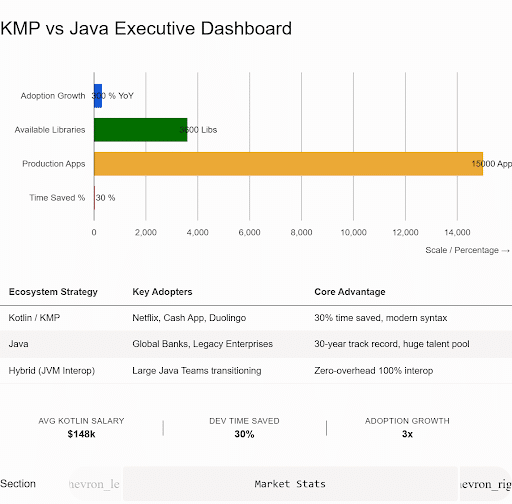
Deciding between Kotlin and Java is no longer a matter of guessing which language will shape mobile engineering. Kotlin has won the Android ecosystem by cutting crash rates, speeding up application development, and powering modern interface toolkits. Java continues to hold its ground across enterprise server infrastructure, running complex backend systems reliably.
Matching each language to its natural strength allows engineering teams to build fast mobile applications while keeping core server infrastructure stable. The real victory lies in using both technologies intentionally to support your technical roadmap and business goals.
Build It Right the First Time
Is Kotlin better than Java? That depends. Choosing between Kotlin and Java isn’t a one-time decision. It’s a plan that needs to match your product, your team, and your time frame. 5StarDesigners builds Android apps using Kotlin. They support it with AI-powered tools. Add security steps at every stage of the development process.
Whether you are beginning an app or thinking about changing from Java to Kotlin, 5StarDesigners can help you make the choice with real engineering behind it, not just personal taste.
The Bottom Line
The Kotlin vs Java question doesn’t have one universal answer, and by now it shouldn’t need one. Kotlin owns new Android development, backed by Google, better crash rates, and a cross-platform tool Java can’t match. Java still runs the enterprise world, carried by decades of working code and millions of developers who know it well.
However, artificial intelligence has added a new chapter. Generated code in either language now needs a human check before it ships. The best business decision in 2026 is not about picking a winner. They are using each language where it belongs and creating a team that can switch between both without slowing or risking safety.
FAQs
Is Kotlin better than Java for Android?
For new projects, yes. Google introduces its latest tools first for Kotlin, and the crash-rate data backs it up.
Does Java still play a key role in 2026?
For existing enterprise systems, absolutely. Migration rarely pays for itself unless you’re also planning a bigger rebuild.
Is AI-generated code safe to ship?
Not without review. Nearly half of it still carries a known vulnerability, and Java code fails security checks more often than any other language tested.